
Key Takeaways
- Teamified lets you create a branded careers page connected to your applicant tracking system (ATS).
- Your careers page can display your approved job openings and has a public URL you can share or link to from your website.
- Applications submitted through your Teamified careers page enter your hiring pipeline.
- Our AI hiring platform supports resume screening and candidate verification. AI interviews are optional and can be enabled or disabled in your hiring pipeline.
- Your hiring team reviews candidate information and makes the final hiring decisions.
Teamified lets you build a branded careers page and sends applications directly into your AI hiring pipeline for screening and review.
You can customise your page, publish open roles and share it with candidates. Applications submitted through your Teamified careers page are managed in the platform.
Because collecting applications is only the first step. What happens next matters just as much.
We've built our careers page feature into Teamified so your hiring team can manage job postings, applications and candidate assessments through one connected workflow.
What is a branded careers page?
A branded careers page is a company-controlled webpage where candidates can explore open positions and apply for jobs.
It allows businesses to present their hiring opportunities using their own branding rather than relying only on standard job listings.
A careers page can also be connected to an applicant tracking system, or ATS, which manages applications and recruitment stages.
With Teamified, the careers page and hiring pipeline are part of the same platform.
What should a company careers page include?
An effective careers page should make it easy for candidates to understand the opportunity and take the next step.
Three elements are especially important:
- Company information: Help candidates recognise your business and understand who they're applying to.
- Open job roles: Display available positions with clear job titles and descriptions.
- A clear application process: Make it easy for candidates to find a role and submit their application.
Your company branding also matters. Using your logo, colours and consistent presentation helps candidates recognise your organisation.
But the careers page is only one part of the experience. Once someone applies, the hiring process needs to continue.
How to create a branded careers page with Teamified
Our careers page builder connects directly with Teamified's AI hiring platform.
Here's how it works.
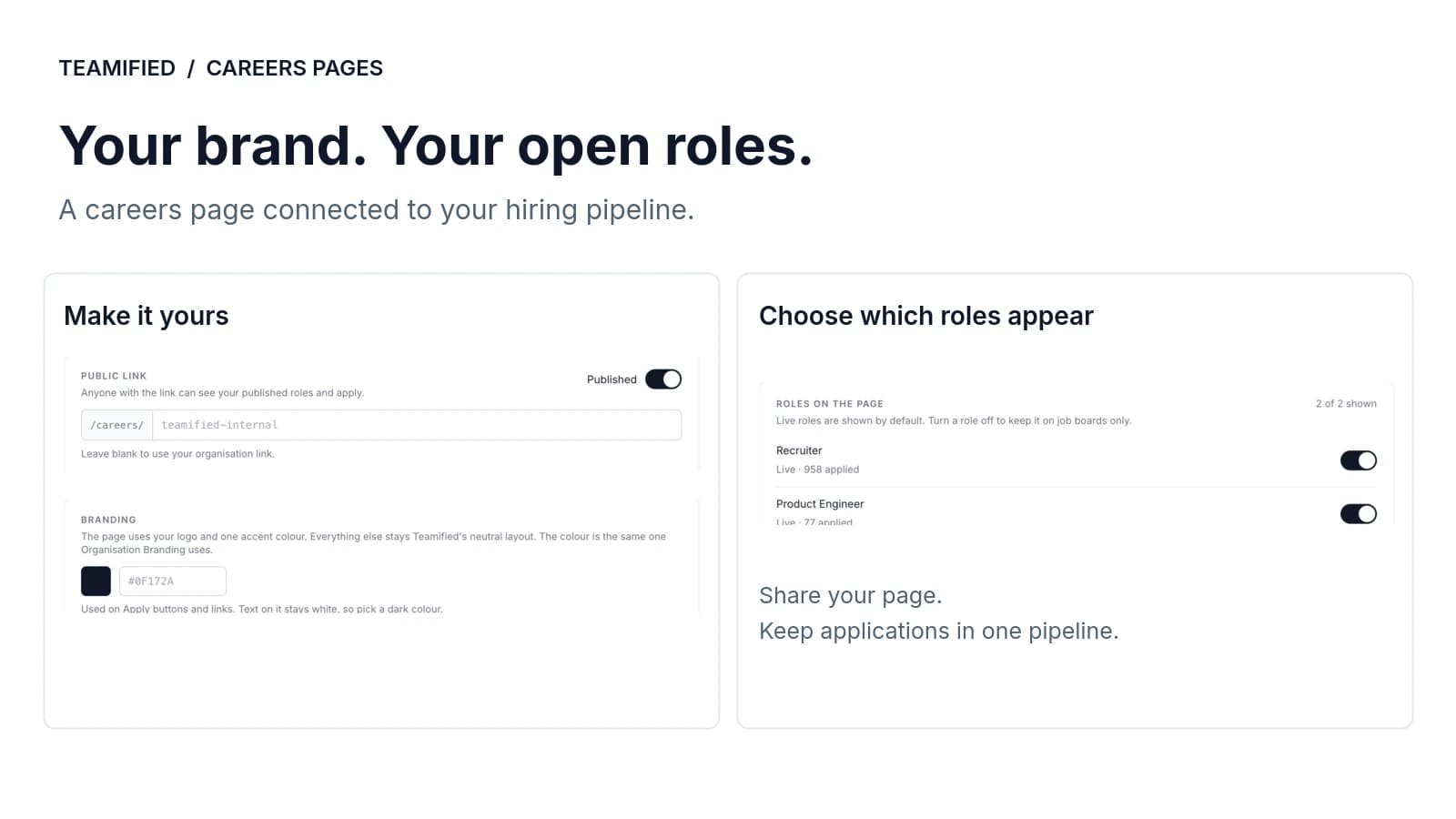
1. Customise your careers page
Your careers page should reflect your company.
With Teamified, you can customise the page using your company logo, brand colours and layout.
This gives candidates a consistent experience when exploring your open positions.
You can create the page within Teamified rather than building a separate recruitment website.
2. Publish your approved job openings
Once your hiring team approves a job posting, the role can appear on your branded careers page.
Our job posting workflow connects your approved vacancies with your careers page and supported job boards.
This means candidates can discover your opportunities through different recruitment channels.
Your hiring team approves the job details before publication.
Learn more about our Job Posting and Sourcing features.
3. Share your public careers-page URL
Once your careers page is ready, Teamified provides a public URL you can share with candidates.
You can share the link on social media, in recruitment campaigns or on your company website.
For example, a business could add a Careers link on its website that takes visitors to its public Teamified careers page to explore available positions.
This gives candidates a dedicated destination for your job openings.
4. Receive applications directly in your hiring pipeline
When candidates apply through your Teamified careers page, their applications enter your hiring pipeline.
Your hiring team can manage incoming applicants, review candidate information and move them through the recruitment stages.
Our AI hiring features can then support screening, verification and interviews based on your configured workflow.
Applications from your careers page, connected to your hiring workflow.
Watch how Teamified's careers page works
See how to create and publish a branded careers page connected to your hiring platform.
In this demonstration, we show how to:
- 1Customise a careers page using company branding.
- 2Display approved job openings.
- 3Publish and share the careers page.
- 4Connect incoming applications with your Teamified hiring pipeline.
The video shows how a careers page fits into a wider recruitment workflow, rather than operating as a separate website.
Why connect your careers page to an applicant tracking system?
Connecting a careers page to an ATS helps businesses manage applications and recruitment stages in one place.
Without that connection, some hiring teams may rely on website forms, email inboxes or spreadsheets before moving candidate information into their recruitment software.
A connected workflow reduces that administrative handover.
| Separate careers page and hiring tools | Connected Teamified workflow |
|---|---|
| Applications may arrive through website forms or email | Applications from your Teamified careers page enter your hiring pipeline |
| Recruiters may transfer candidate information manually | Candidate records are available within the platform |
| Screening may require another tool | AI screening is part of the hiring workflow |
| Candidate progress may be tracked across systems | Hiring stages are managed within Teamified |
The benefits go beyond administrative work.
A complicated application process can also affect candidate experience.
According to the 2025 Employ Job Seeker Nation Report, 35% of surveyed job seekers said they would abandon an application if it took too long.
This finding highlights the importance of a clear application experience. It does not mean that connecting an ATS automatically prevents candidate drop-off, but it reinforces why businesses should review the full application journey.
What happens after someone applies through Teamified?
Once an application enters Teamified, our AI hiring platform can support the next recruitment stages.
The exact process depends on how your hiring team configures the role.
Resume screening
Our AI resume screening analyses applications against the job requirements.
It helps identify relevant skills, experience and potential gaps, giving recruiters information to review.
Candidate verification
Our AI verification agent can make follow-up calls to check candidates' employment roles, dates and claims from their resumes.
Potential inconsistencies or flags are made available for human review.
These checks provide additional information. They don't replace the hiring team's responsibility to assess the evidence.
Learn more about AI Screening and Verification.
AI interviews
Note: AI interviews are optional, not mandatory. You can enable or disable them in your hiring pipeline.
When enabled, candidates can progress to structured AI interviews based on your configured workflow. Our platform helps capture interview responses and generate assessments that recruiters can review.
Explore our AI Interviews.
Hiring team review
Recruiters and hiring managers can review candidate information, screening results and interview assessments before deciding who progresses.
Our AI agents support the recruitment process. Your hiring team makes the final decision.
Do you still need job boards if you have a branded careers page?
A branded careers page and job boards serve different purposes.
Your careers page gives candidates a dedicated place to explore opportunities with your company.
Job boards can help you reach people who may not already know your business.
Applications submitted through your Teamified careers page enter your hiring pipeline, where your team can review candidates and manage the next recruitment stages.
Who benefits from a branded careers page connected to an ATS?
A connected careers page can be particularly useful for businesses that hire regularly or manage several vacancies.
Growing businesses can maintain a dedicated careers page as new positions become available.
HR and talent acquisition teams can review careers-page applications within one recruitment workflow.
Businesses hiring across multiple locations or departments can give candidates a central place to explore open roles.
Companies with an existing website can link to their public Teamified careers page, with applications submitted through that page entering their hiring pipeline.
The main benefit isn't simply having a page for job listings. It's connecting that page with the recruitment work that follows.
Frequently asked questions
A branded careers page is a company-controlled webpage that displays open positions and allows candidates to apply. It typically includes company branding, job descriptions and application links.
Yes. Teamified includes a careers page builder that lets you create a page using your company branding. Your approved job openings can appear on the page, with applications connected to your hiring pipeline.
Teamified provides a public careers-page URL. You can share that link with candidates through social media and recruitment campaigns, or add a link on your company website that takes visitors to your Teamified careers page.
Yes. Approved job postings are published to your branded careers page as part of Teamified's job posting workflow.
Applications submitted through your Teamified careers page enter your hiring pipeline, where your hiring team can review candidate information and manage the next recruitment stages.
Teamified supports AI resume screening, candidate verification and AI interviews. These features work according to the configured hiring process, with candidate information and assessment results available for human review. AI interviews are optional and can be enabled or disabled in your hiring pipeline.
No. AI interviews are optional. Your hiring team can enable or disable AI interviews in your Teamified hiring pipeline to suit your recruitment process.
Yes. Our AI verification agent can call candidates to check details such as previous roles, employment dates and claims made in their applications. Any flagged information can be reviewed by your hiring team.
Job boards can help you reach candidates beyond your existing audience. Your careers page provides a branded destination for applicants. Applications submitted through your Teamified careers page enter your hiring pipeline.
A careers page helps candidates find jobs and submit applications. An applicant tracking system manages candidate records, screening and recruitment stages.
Teamified combines these functions in one AI hiring platform.
Your careers page is just the beginning
A branded careers page gives candidates a place to discover opportunities with your company.
But the hiring process doesn't end when someone clicks Apply.
With Teamified, we've connected careers pages, job posting, screening, verification and interviews within one AI hiring platform.
Your team can manage applications from your careers page, review candidate assessments and focus on finding the right people.
Ready to connect your careers page with your hiring process?
Explore more insights

About the Author
Simon Lee
Co-Founder, Teamified
Simon Lee is the co-founder and CEO of Teamified, with deep expertise in cloud architecture, fintech, and SaaS platforms. He leads the vision behind Alexia.ai, designing AI-powered solutions that drive operational efficiency and business growth across global teams.
Connect on LinkedIn